

Set up your site for AI visibility in 4 steps
Complete these steps and validate your setup to ensure AI systems can understand, trust, and use your content
- Start here to complete your SearchShifter™ setup correctly
- Watch the walkthrough first, then use the steps below if you need extra guidance
STEP
1
Install and Validate Setup
Activate the plugin, then check your setup inside the SearchShifter™ plugin to ensure everything is configured correctly
Open the plugin setup page
Need help? View setup guide
Plugin is installed and activated
Once complete, move to step 2
Continue to the next step to validate your setup
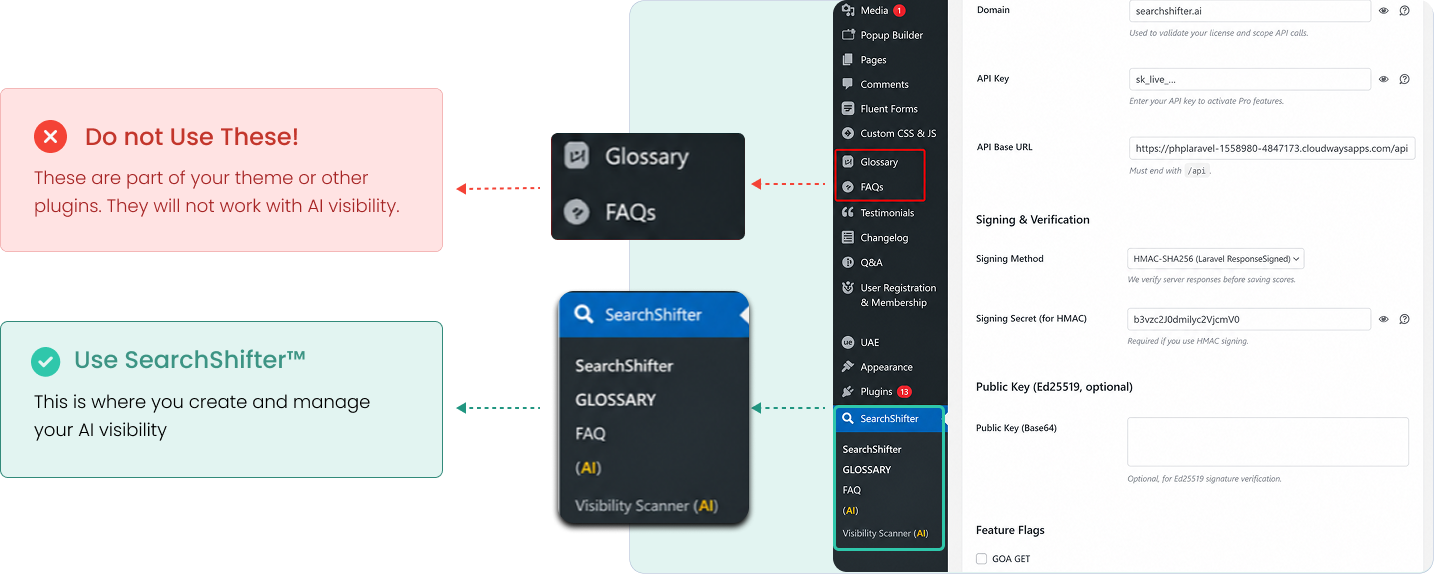
After SearchShifter™ plugin is installed and activated follow these steps :
- 1. Open your WordPress dashboard
- 2. In the left menu, click SearchShifter™
- 3. Select Glossary or FAQ inside the SearchShifter™ menu
- 4. Only use the Glossary and FAQ pages created by SearchShifter™
- 5. Do not use glossary or FAQ pages from your theme or other plugin
STEP
2
Write your first Glossary terms
Create and define the key terms for your business
Rule 1 : Start with the term and define it using "is"
Begin the first sentence with the term and state exactly what it is using “is”
Rule 2 : Define one concept in one sentence
Write one idea that explains what the term is. Do not replace or vary the wording
Rule 3 : Use the same wording everywhere
Write the definition once and replace it exactly across your site. Do not rephrase or vary the wording
Stop and Confirm
You opened this page from the SearchShifter™ plugin. If not, go back and open it there
You should see them
A page titled "SearchShifter™ Glossary" inside your WordPress dashboard
STEP
3
Write your FAQ content
Create direct answers that AI systems can extract, and combine into responses
Rule 1 : Answer the question in the first sentence
Start the answer with a direct, complete response. Do not begin with context, explanation, or background
Rule 2 : Write one question with one clear intent
Ask the question the way a real person would ask it. Do not combine multiple questions or ideas into one
Rule 3 : Use the same wording everywhere
Use the same terms and phrasing every time you explain the same idea. Do not vary wording or introduce new versions of the same concep
Stop and Confirm
You opened this page from the SearchShifter™ plugin. If not, go back and open it there
You should see them
A page titled "SearchShifter™ Glossary" inside your WordPress dashboard
Need help? Write AI visible FAQs
STEP
4
Link your Glossary terms across your site
Reinforce meaning across pages so AI systems can trust and reuse your content
Pro and Authority plans handle linking automatically. No action is required. Manual linking is only needed on the Free plan
Rule 1 : Use the exact glossary term wording every time
Use the same term exactly as it is defined. Do not use synonyms or variations anywhere on the site
Rule 2 : Link the term across multiple pages and contexts
Use the term in glossary, FAQ, and other pages. Repeat it in different places so the meaning is reinforced
Rule 3 : Link each term back to its glossary definition
Each page must include at least one link back to the glossary term. This connects all users of the term to a single, clear definition
Before you click publish, confirm the following
- Each core term appears across multiple pages
- The same wording is used every time
- Each page links back to the glossary
- Stop and Con Terms are used in multiple firm FAQs
- Once complete, move to Validate and publish
Need help? How to link glossary terms for AI visibility